Even in the GPT era, I regularly meet engineers who know ssh user@host and stop there. Yet hiding behind three flags — -D, -R, -L — is a full replacement for a VPN client, a mesh VPN, and a proxy stack. There’s also a story below about how engineers at one very big Korean corp used a single reverse tunnel to keep working past locked doors — for years, long before COVID.
3 flags · 3 bonuses · 1 man page. I hope it’s intriguing enough to give it a try :)
Disclaimer: no, it’s not actually Tailscale — Tailscale solves different problems and does them far more conveniently. But for “I just need to reach my boxes,” SSH punches through the same holes :))
-D — Dynamic Forward: The VPN Hiding Inside Your SSH
Not one forwarded port. Every port. Every host. Every DNS name. Everything that server can reach — your laptop can reach.
ssh -D 127.0.0.1:9876 user@corp-bastion.com
-D opens a SOCKS5 proxy locally. Any app that speaks SOCKS5 (Firefox, curl, psql, ssh itself, basically everything) routes through the remote server. Tick Proxy DNS when using SOCKSv5 → even DNS resolves on the remote side.
Result: your browser lives inside the remote network.
Most people know
-Lforwards one port.-Dforwards the whole internet that server can see. Very different tool.
One flag replaces your corporate VPN:
- Internal corp apps — Grafana, Kibana, Jira, wikis. Open in Firefox, no VPN client, no Tailscale, no admin tickets.
- IPMI / iDRAC / BMC networks — reach the management LAN from your laptop via the one jump host that sees it. No per-port
-Lgymnastics. - Firewall / geo bypass — your browser profile exits through the remote country.
- Debug from the server’s POV — “why does my laptop see this and theirs doesn’t” becomes answerable.
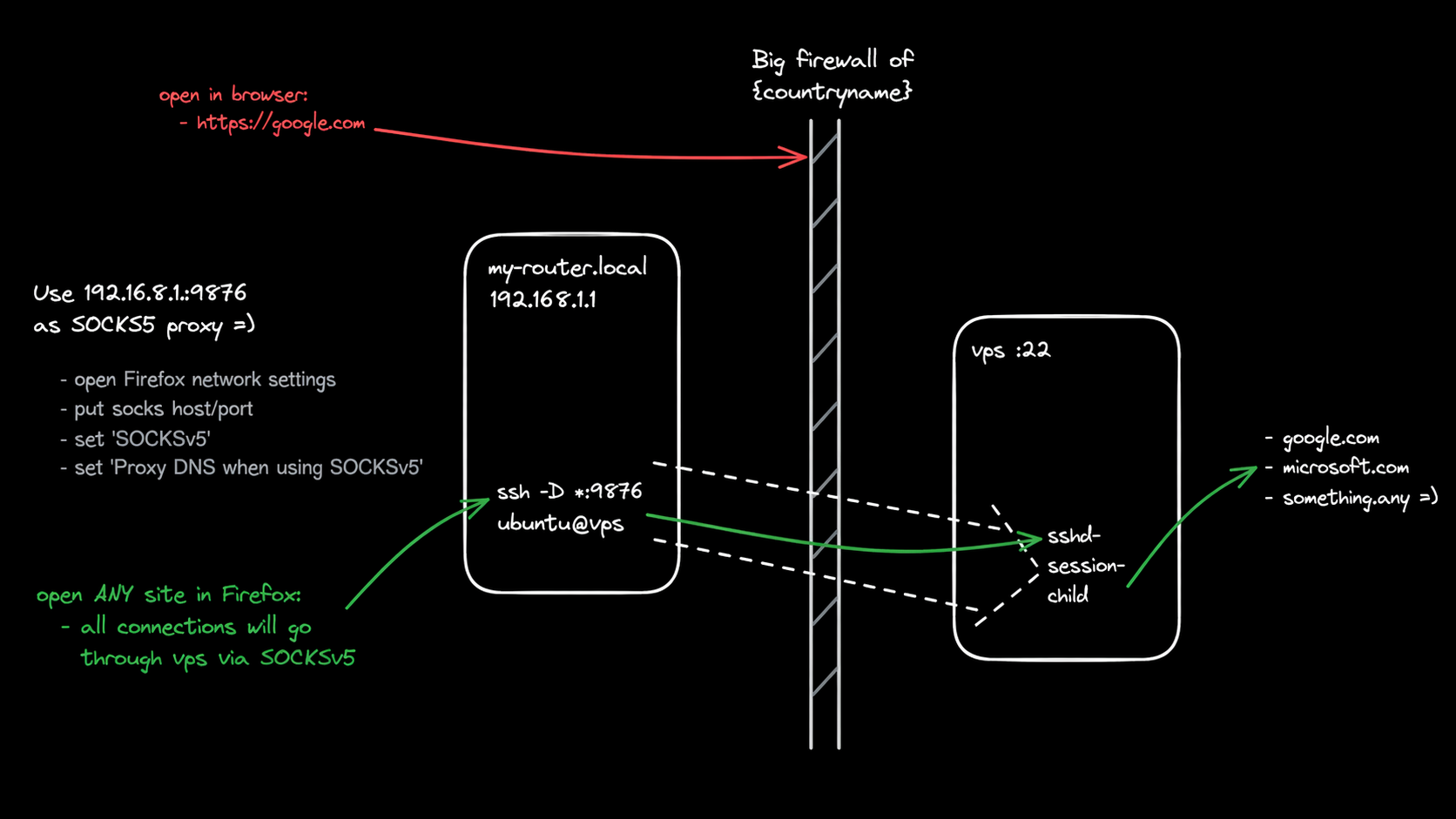
Note: the diagram runs -D on a router — turns your whole LAN into a shared SOCKS5 exit. Usually you just run it on your own laptop.
-R — Reverse Tunnel: You Don’t Need Tailscale
10 NAT’d boxes — at home, at customers, in random clouds — and you want to reach all of them. You need one VPS and this on every box:
# on box1:
ssh -fNT -R 0.0.0.0:2201:127.0.0.1:22 tunnel@my-vps.com

# on box2:
ssh -fNT -R 0.0.0.0:2202:127.0.0.1:22 tunnel@my-vps.com

# on box3:
ssh -fNT -R 0.0.0.0:2203:127.0.0.1:22 tunnel@my-vps.com
From anywhere:
ssh -p 2201 user@my-vps.com   # → box1
ssh -p 2202 user@my-vps.com   # → box2
ssh -p 2203 user@my-vps.com   # → box3
One public VPS. N tunnels. N NAT’d boxes reachable. Wrap in a systemd unit or
@rebootcron for persistence :))
Want to expose a web server? ssh -R 443:localhost:443 vps — done.
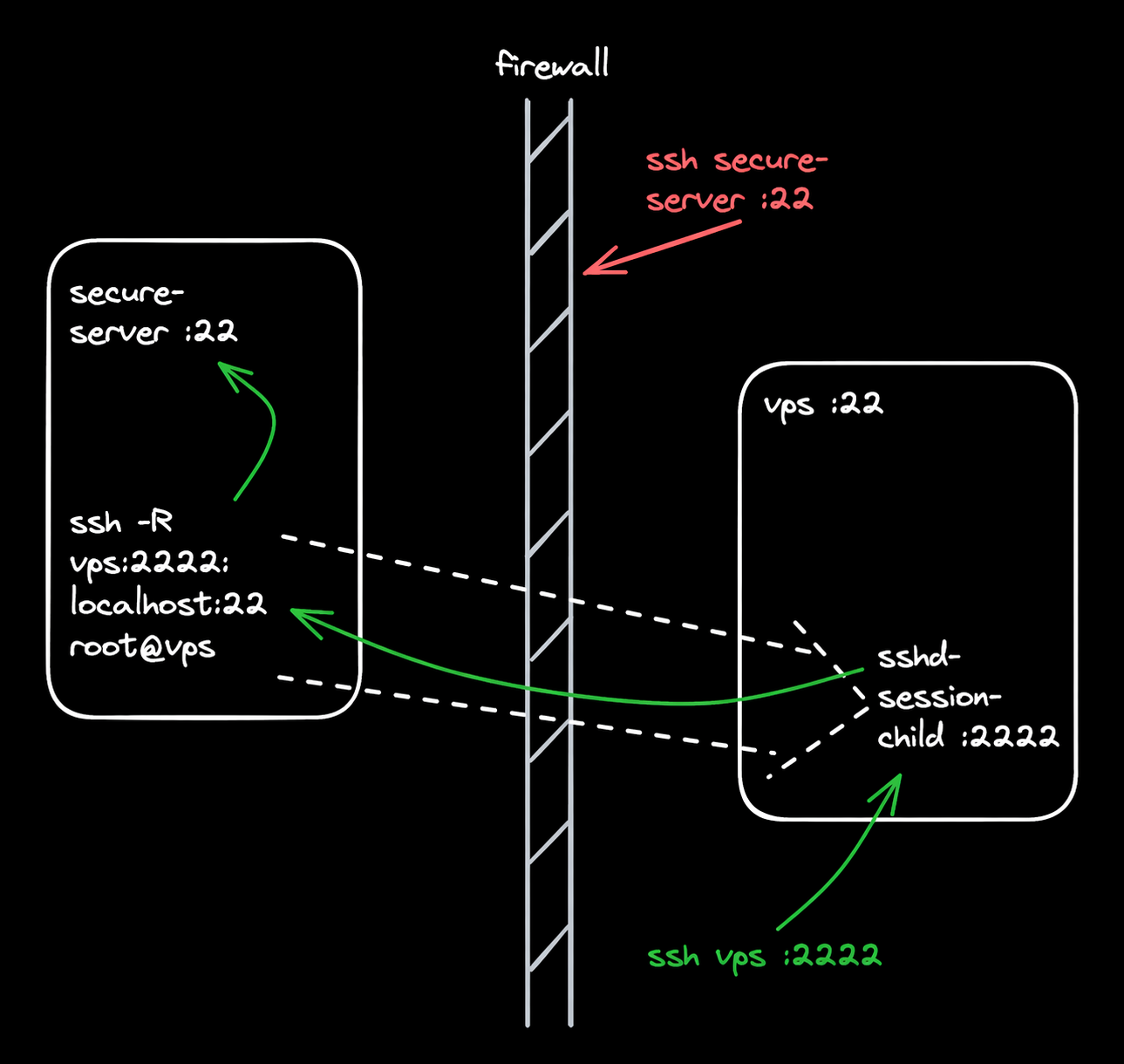
Under the hood: one outbound SSH session from a NAT’d box makes a public port on the VPS. Anyone hitting the public port (vps:2222 in the diagram below) lands on 127.0.0.1:22 of the original box. All through a single TCP connection the firewall already allows.
-R — Cautionary Tale: How Engineers Escape Corp
Same flag, other direction. Big Korean corp. Office-only desktops, badges, cameras, NAT’d grey IPs, firewall cutting everything inbound. And the best part — your desktop auto-shuts-off after 8 hours. Work-life balance, problem solved :))
Except not everyone in the world is Korean. On their work desktop, engineers just run:
ssh -fNT -R 0.0.0.0:2222:127.0.0.1:22 root@my-vps.com
From anywhere: ssh -p 2222 corp-user@my-vps.com → lands on their locked-down corporate desktop. Through the firewall. Through the grey NAT. For years. Long before COVID.
The real lesson: outbound ≈ inbound. Any allowed outbound protocol does the same — HTTPS with a custom client, DNS, whatever. If you can reach out, something can reach in.
-L — Local Forward: mysql on a Server, mysql on Your Laptop
Local login only, no network exposure. But you want to connect from your code, on your laptop.
ssh -L 127.0.0.1:3306:127.0.0.1:3306 user@db-server
Now localhost:3306 on your laptop is mysql on the server.
Bonus: -L forwards Unix sockets too.
# socket → socket
ssh -L /tmp/mysql.sock:/var/run/mysqld/mysqld.sock root@db
mysql --socket /tmp/mysql.sock --user root

# TCP → socket (when mysql only listens on a socket)
ssh -L 127.0.0.1:5555:/var/run/mysqld/mysqld.sock root@db
mysql --host 127.0.0.1 --port 5555 --user root
-R does sockets too. Read the man page :)
-L — Firewall Bypass: google.com Doesn’t Open? Your VPS Says Hi
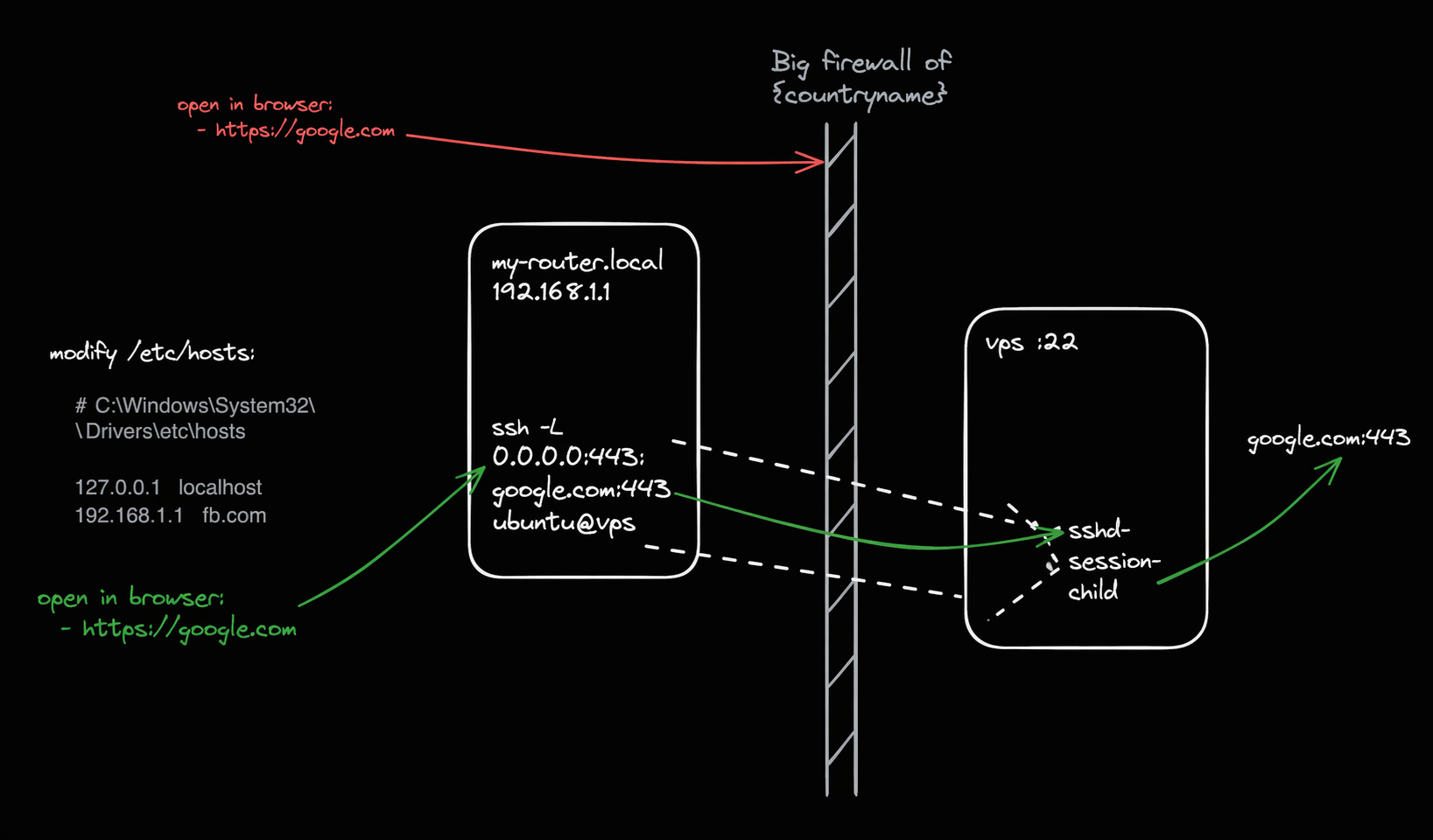
ssh -L 0.0.0.0:443:google.com:443 ubuntu@vps
Add 127.0.0.1 google.com to your hosts file (or the tunnel box’s LAN IP — 192.168.1.1 in the diagram, where it runs on the router). Open Chrome → google.com → works. No VPN, no proxy config, no client software.
Bonus Flags Worth Knowing
-J — jump host, no VPN:
ssh -J bastion.corp prod-db.internal
-X — remote GUI on a headless server:
ssh -X user@server firefox # window opens locally
-w — full L3 VPN via tun devices:
ssh -w 0:0 root@server # real VPN in one command (+ root)
Three more flags most engineers have never typed. Read the man page.
Takeaway: SSH Is Absurdly Powerful. Most Engineers Use 5% of It.
- Everyone knows
-L. Few know it forwards Unix sockets too. - The two flags most engineers have never typed — and the two most powerful:
-D→ full network access through one SSH session. Replaces corp VPN for most read-only needs.-R→ one public VPS replaces a mesh VPN for reaching N NAT’d boxes.
- Outbound connections are never “safe”. Whatever you can reach, can reach you.
- ChatGPT is decent at “is this possible?” Bad at syntax. Verify.
- Read the man page. Seriously.